




TripMemo Editorial Team
Research & review
12 min read•Published •Updated
Summary
Compare travel journal apps for AI trip planning, photos, offline notes, country stats and sharing. Find the right fit for your travel journal.
In 2026, keeping a travel journal doesn't mean carrying around a bulky notebook. The best travel journal apps automatically organize your photos, track your locations, and let you share your journey: all from your phone.
But with dozens of apps available, which one is actually worth your time?
This is an editorial comparison published by TripMemo, one of the apps included. We compare the jobs each app serves and link to product sources. This is not a controlled performance or battery test.
Quick Comparison Table
Choosing mainly for your camera roll? Our comparison of apps for organising travel photos looks specifically at trip albums, date and location sorting, shared photos and printed books.
1. TripMemo: Best for Planning, Travel Stats and Shared Photo Journals
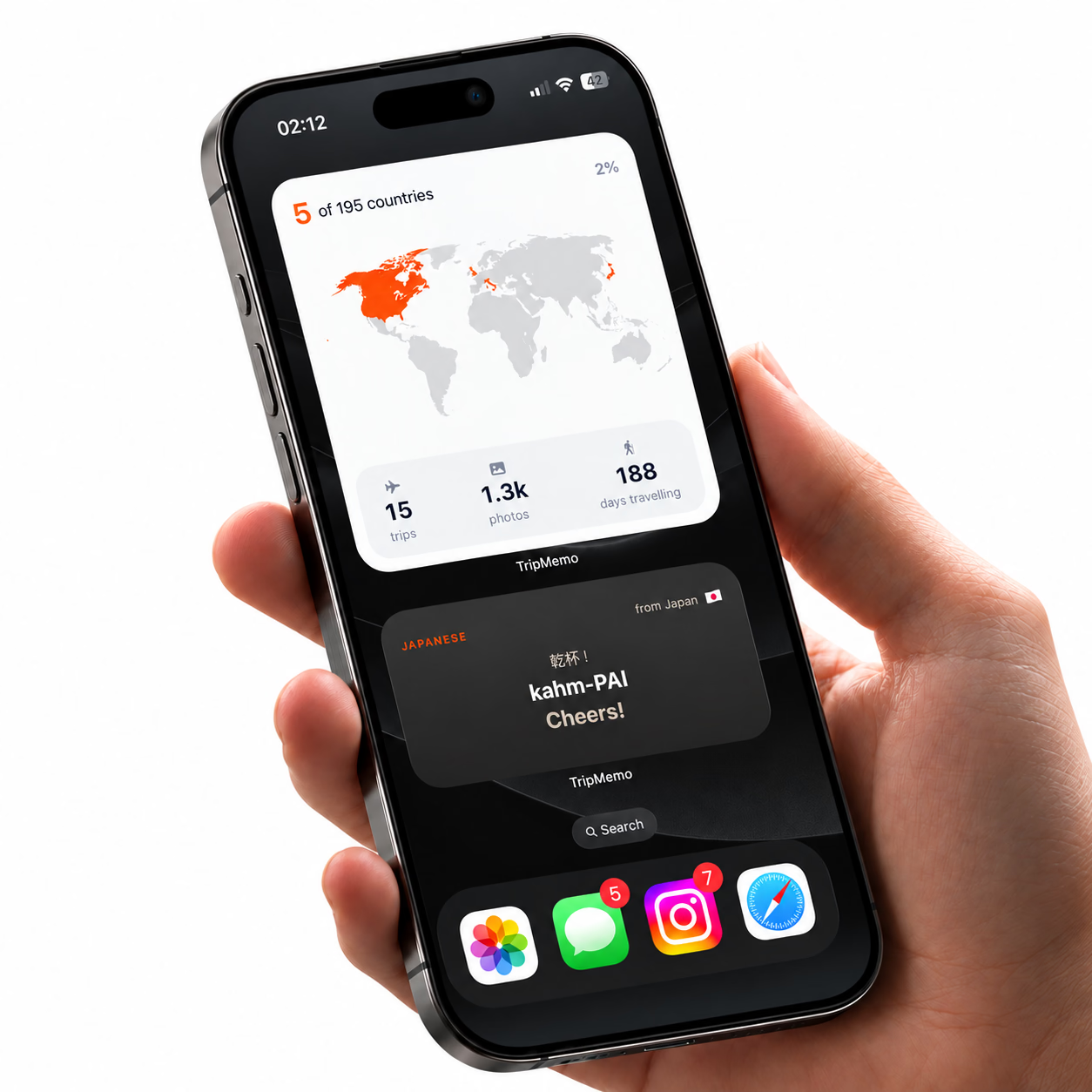
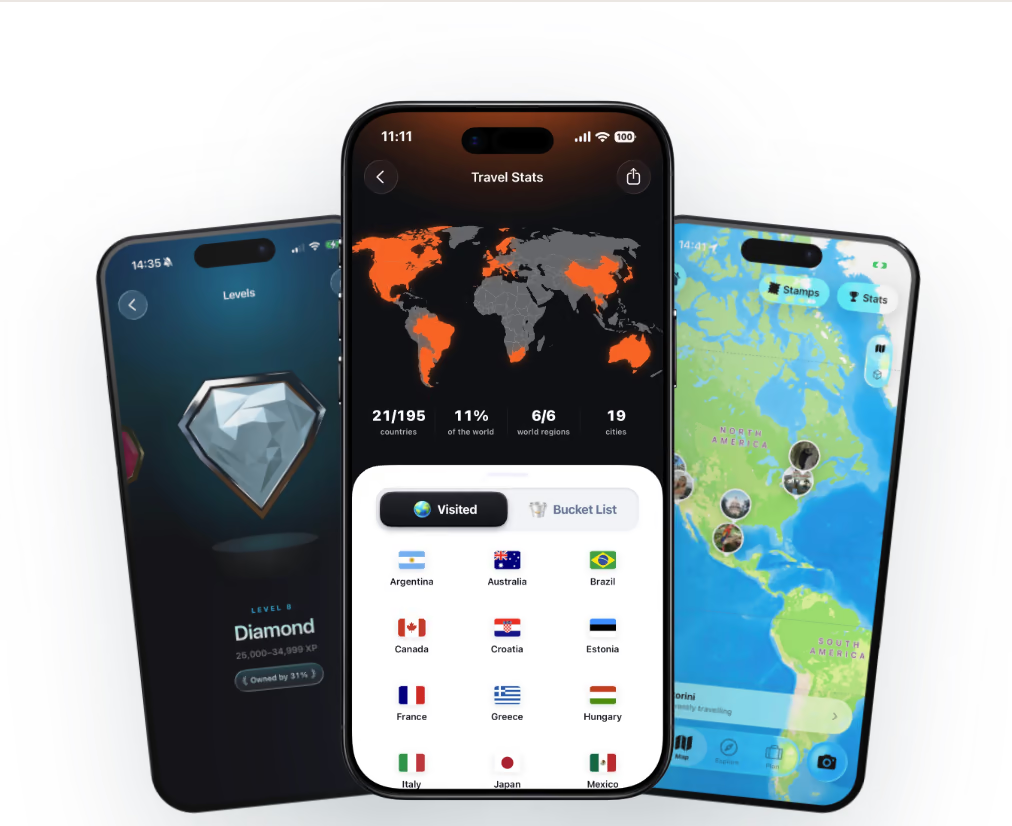
TripMemo is an iPhone travel planner and journal app. You can create a personalised AI itinerary or plan manually, track countries and travel stats, and keep photos, notes and places in day-by-day TripBooks. You can create a TripBook directly from your plan, then document what happens on the trip.
What you can do:
- Plan with AI or manually: Choose your destination, dates and preferences, including interests and pace. Generate an itinerary, edit activities and reorder days, or build the plan yourself. Explore AI itinerary planning.
- Keep practical details together: View your itinerary map, places to stay, flight information, destination guides and lists within the destination plan.
- Discover and save ideas: Explore destinations and keep a bucket list. Save travel inspiration from supported apps such as Instagram, TikTok, Safari and X to Bookmarks for later reference.
- Create a TripBook from your plan: Start the journal directly from the itinerary. This does not mean later changes automatically sync between the two.
- Keep a day-by-day photo journal: Add photos, notes, captions and places. Bulk upload past photos into days and revisit them in book, image and Polaroid-style views.
- Track countries and travel stats: Explore your travel globe, visited countries, places and travel calendar, with levels and progression. See travel stats.
- Capture photos and notes offline: Save memories without a connection and sync when you reconnect.
- Contribute together: Invite companions to add photos and notes to the same TripBook. Contributions sync when connected, rather than requiring everyone to send photos through separate chats.
- Share without requiring the app: Send a view-only TripBook link that opens in a browser without an app or account. Viewing and invited contributions are separate permissions.
- Use the vintage camera: Capture travel photos with four colour filters inside the app.
Know the boundaries: TripMemo runs on iPhone; browser links are for viewing shared TripBooks, not editing itineraries. It does not continuously track your location or provide turn-by-turn navigation. Flight information does not mean automatic reservation imports or live flight alerts. Offline photo and note capture does not imply offline AI generation or itinerary maps. Invited TripBook contributions are distinct from simultaneous itinerary editing.
Best for: Travelers who want planning, country tracking and a photo journal in one app, including couples and groups who want to contribute to a shared TripBook.
.avif&w=3840&q=75&dpl=dpl_B2DaXHBbNucfRgJqqwj2zMaECZud)
Download TripMemo
Beautiful TripBooks, real-time group journaling, stats, vintage camera, offline mode and more!
.avif&w=64&q=75&dpl=dpl_B2DaXHBbNucfRgJqqwj2zMaECZud)
2. Polarsteps : Best for Route Tracking
The Vibe: "Automatic GPS tracking that shows exactly where you went."
Polarsteps is excellent at one specific thing: plotting your journey on a map with automatic GPS tracking. It creates a visual line showing every kilometer you traveled.
What sets it apart:
- Automatic tracking: Just enable GPS and forget about it: your route is documented
- Beautiful maps: The travel path visualization is genuinely impressive
- Trip statistics: Distance traveled, countries visited, travel time
- Export options: Create printed photo books from your trips
Limitations:
- Travel Together supports shared trips; compare its permissions with the collaboration you need
- Background tracking uses location permissions; battery impact depends on device and settings
- Check current feature availability and permissions before travel
- The social feed can feel performative
Pricing: Core features are free; Polarsteps Plus is €8.99/month or €29.99/year, with regional pricing shown in the app
Best for: Solo travelers who want automatic route documentation without manual effort.
3. Day One : Best for Writers
The Vibe: "The serious writer's digital sanctuary."
Day One is the gold standard for long-form, text-based journaling. If you love writing detailed reflections rather than photo-heavy entries, this is your tool.
What sets it apart:
- Exceptional writing experience: Clean, distraction-free interface optimized for text
- Robust privacy: End-to-end encryption available
- Cross-platform: Works on iOS, Mac, Android, and web
- Templates and prompts: Built-in journaling aids
- Multiple journals: Separate journals for different purposes
Limitations:
- Not built specifically for travel (general-purpose journal)
- Shared Journals support invited entries; compare the workflow with a trip-specific journal
- Photo management isn't the focus
- Travel-specific features (maps, routes) are basic
Pricing: A free Basic tier, plus paid Silver and Gold tiers; check Day One for current regional pricing
Best for: Writers who want a private, text-focused digital diary that happens to work during travel.
4. Wanderlog : Best for Trip Planning + Light Journaling
The Vibe: "The ultimate itinerary aggregator that can also journal."
Wanderlog is primarily a trip planner: excellent for organizing bookings, itineraries, and logistics. It has some journaling features, but they're secondary to planning.
What sets it apart:
- Itinerary organization: Import reservations, map out days, organize logistics
- Collaboration: Plan trips with friends and family
- Offline access: Access your itinerary without internet
- Restaurant/attraction research: Built-in discovery features
- Notes per location: Add memories to specific places
Limitations:
- Journaling is an afterthought, not the primary function
- More about before the trip than during
- Not designed for memory preservation
- Limited photo journal capabilities
Pricing: A free tier with an optional Pro subscription; current pricing is shown by Wanderlog
Best for: Planners who want their itinerary and journal in one place (even if journaling is basic).

Join the TripMemo
Newsletter
Unsubscribe anytime. Read our privacy policy.
5. FindPenguins : Best for Social Travel Blogging
The Vibe: "Share your journey with an audience in real-time."
FindPenguins combines travel tracking with social features, letting you share "Footprints" as a public or semi-public travel blog.
What sets it apart:
- Travel-specific social network: A community of travelers
- Footprint system: Document locations with photos and stories
- Print options: Create physical travel books
- Following/followers: Build an audience for your travels
- Automatic location tracking: Similar to Polarsteps
Limitations:
- Social focus can feel performative
- Interface can feel cluttered with community features
- Privacy requires deliberate settings management
- No real-time collaboration on shared trips
Pricing: Free, with no premium subscription according to FindPenguins' current support guidance
Best for: Travelers who want to share their journey publicly and connect with other travelers.
6. Google Photos : Best Free Option for Photo Backup
The Vibe: "Not a journal, but your photos are safe and organized."
Google Photos isn't a journal app, but it solves the most important problem: keeping your travel photos safe and somewhat organized.
What it does well:
- Automatic backup: Photos sync to cloud without thinking
- AI organization: Groups by location, faces, events
- Search by location: "Photos from Paris" actually works
- Memories feature: Surface old photos automatically
- Cross-platform: Works on everything
Limitations:
- No journaling functionality (just photos)
- No storytelling or narrative features
- Privacy concerns with Google
- Requires separate text journaling solution
- 15GB free limit fills up
Pricing: 15GB is included with a Google Account; optional storage plans vary by country
Best for: People who just want their photos backed up and can journal separately (or not at all).
7. Apple Journal : Best Free Option for iPhone Users
The Vibe: "Apple's built-in journaling app that uses your iPhone data intelligently."
Introduced in iOS 17, Apple Journal leverages your existing iPhone data: photos, locations, music, workouts: to suggest journaling moments.
What sets it apart:
- Apple integration: Available for compatible Apple devices
- Smart suggestions: Uses your data to prompt entries
- Privacy-focused: On-device processing, no cloud sync required
- Simple interface: Clean Apple design
- Integrates with iPhone: Photos, locations, music all accessible
Limitations:
- Available on compatible Apple devices, including iPhone, iPad and Mac; check OS requirements
- Basic features compared to dedicated apps
- No collaboration
- Export is supported; check the format and workflow you need
- No travel-specific features
Pricing: Free
Best for: iPhone users who want to try journaling with zero commitment.
8. Notion : Best for Customizers
The Vibe: "Build your perfect travel journal from scratch."
Notion isn't a travel app: it's a flexible workspace where you can create anything, including custom travel journals with exactly the features you want.
What sets it apart:
- Infinite customization: Build any system you can imagine
- Database capabilities: Create linked databases for trips, photos, expenses
- Templates: Community templates for travel journaling
- Cross-platform: Works everywhere
- Flexible access: Generous free plan
Limitations:
- Requires setup time (not plug-and-play)
- No travel-specific features built-in
- Offline access is limited on flexible access
- Photo management is clunky
- Learning curve
Pricing: A free plan with optional paid tiers; current regional pricing is shown by Notion
Best for: People who love building systems and want complete control over their journal format.

%20copy%202.avif&w=384&q=75&dpl=dpl_B2DaXHBbNucfRgJqqwj2zMaECZud)
%20copy%203.avif&w=384&q=75&dpl=dpl_B2DaXHBbNucfRgJqqwj2zMaECZud)

Your trips deservemore than a camera roll
.avif&w=96&q=75&dpl=dpl_B2DaXHBbNucfRgJqqwj2zMaECZud)
9. Steller : Best for Visual Storytelling
The Vibe: "Instagram meets travel blogging."
Steller creates magazine-style visual stories with photos, text, and multimedia. It's designed for beautiful presentation rather than private reflection.
What sets it apart:
- Beautiful templates: Polished, magazine-quality layouts
- Story format: Pages flow like a visual narrative
- Community features: Share stories with other users
- Creator tools: Good for travel bloggers/influencers
Limitations:
- Designed for sharing, not private journaling
- Learning curve for layouts
- Storage limits on flexible access
- Not designed for daily journaling
Pricing: Free to download with optional in-app purchases; regional pricing is shown by the app store
Best for: Visual creators who want to publish polished travel stories (not private journals).
10. Journey : Best for Privacy-Focused Users
The Vibe: "Secure journaling with cloud sync options you control."
Journey is a general journaling app with strong privacy features, making it good for travelers who prioritize data security.
What sets it apart:
- Privacy options: End-to-end encryption, passcode lock
- Cross-platform: iOS, Android, web, desktop
- Google Drive/Dropbox sync: Choose your own cloud
- Coach feature: Guided journaling prompts
- Timeline view: See entries chronologically
Limitations:
- Not travel-specific
- Basic photo features
- No collaboration
- Interface feels dated compared to newer apps
Pricing: Free to download with optional in-app purchases; regional pricing is shown by the app store
Best for: Privacy-conscious users who want encryption and control over their data.
How to Choose: Decision Framework
Answer these questions:
1. Do you travel solo or with others?
- Solo: Day One, Polarsteps, Journey, Apple Journal
- With partner/group: TripMemo (best), Wanderlog
2. Do you prioritize photos or writing?
- Photos: TripMemo, Polarsteps, Google Photos
- Writing: Day One, Journey
- Both equally: TripMemo, FindPenguins
3. Do you want to share publicly or keep it private?
- Private: TripMemo, Day One, Journey, Apple Journal
- Public sharing: FindPenguins, Polarsteps, Steller
4. Do you need planning as well as journaling?
- AI itineraries and photo journaling: TripMemo offers editable AI plans and manual planning, then lets you create a TripBook directly from the plan.
- Reservation organisation and collaborative itineraries: Compare Wanderlog's planning workflow.
- Writing without a trip planner: Compare Day One and Apple Journal.
Check each product's current terms and available features before choosing.
5. How important is offline access?
- Essential: TripMemo, Day One, Journey, Apple Journal
- Nice to have: Wanderlog (partial), Notion (partial)
- Not critical: Google Photos, FindPenguins
Our Recommendation by Traveler Type
| Traveler Type | Best Choice | Why |
|---|---|---|
| Visual journaler with travel partner | TripMemo | Invited contributions, day-by-day photos and notes |
| Solo writer who loves reflection | Day One | Best writing experience, privacy |
| GPS/route tracking enthusiast | Polarsteps | Best automatic tracking |
| AI planning and a finished trip journal | TripMemo | Editable plans, then create a TripBook directly |
| Trip planner who wants light journaling | Wanderlog | Planning + journaling in one |
| Social traveler who shares publicly | FindPenguins | Travel-specific social features |
| Budget-conscious iPhone user | Apple Journal | Free, built-in, decent |
| Privacy-obsessed journaler | Journey | Encryption, cloud control |
| System-builder who wants control | Notion | Infinite customization |
Final Thoughts
The "best" travel journal app depends entirely on how you travel and what you want to capture.
If you had to pick one recommendation:
For most travelers: TripMemo combines AI and manual planning, country stats, photo journaling and invited TripBook contributions. You can start with an itinerary and create a TripBook directly from it.
For writers: Day One remains unmatched for long-form text journaling.
For route trackers: Polarsteps does GPS tracking better than anyone.
But honestly? The best app is the one you'll actually use. Download two or three, test them on your next trip, and keep the one that fits.
Related Reading:
- AI Travel Planner
- Travel Planner and Journal App
- How to Start a Travel Journal
- Photo Travel Journal Guide
- Choosing a Travel Journal App
- The Complete Guide to Travel Journaling
TripMemo feature review: 14 September 2026. This update corrects TripMemo’s planning, tracking, journaling and sharing descriptions. Additional corrections reference Day One Shared Journals, Polarsteps Travel Together and Apple Journal.