Photo-first journaling for travelers
The Travel Photo Journal App that turns photos into stories
Stop losing photos in your camera roll. TripMemo turns your travel photos into daily pages, pins them to places, and creates a shareable book you'll actually revisit.
Still choosing? Compare apps for organising travel photos by albums, maps, shared books and storage.
.webp&w=96&q=75&dpl=dpl_EPXMHFF758wZiFUsuw99japedPYQ)


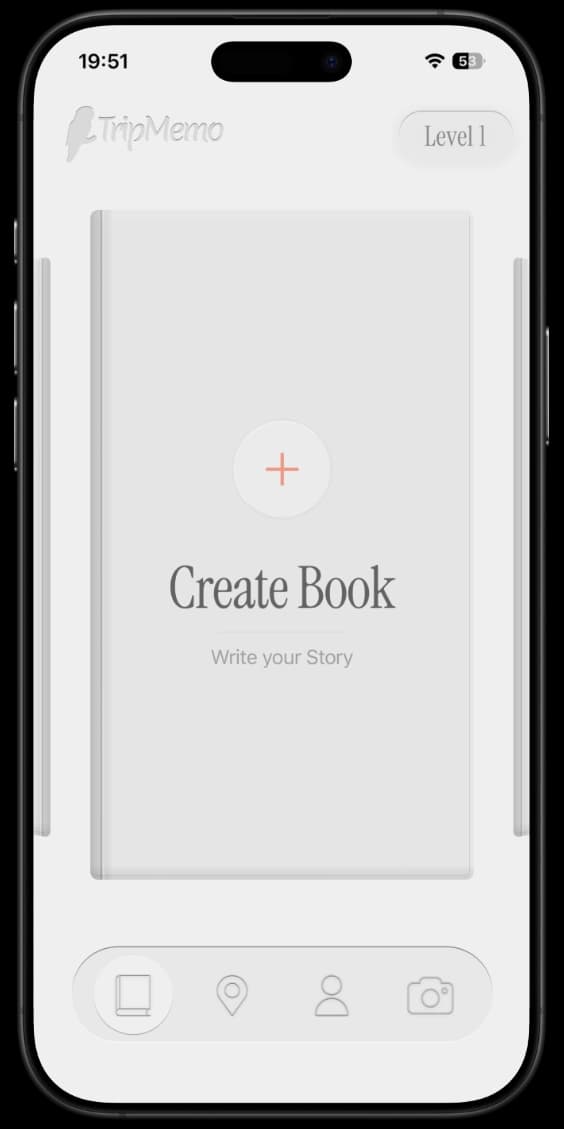
Photo-first pages
Map-connected
Share as a book
100% Private
Photos stay on device
Works Offline
Capture anywhere
Collaborative
Journal together
Start Today
Get started
The Problem
Your Camera Roll is a Graveyard
2,847 photos from last year's trip. Can you find any of them? Do you remember where that restaurant was? That's the problem.
Your Camera Roll
- 2,000+ photos with no organization
- "Where was that place?" — lost forever
- Endless scrolling to find anything
- Photos scattered across 47 group chats
- Can't share without dumping everything
Your Photo Journal
- Photos organized into daily pages
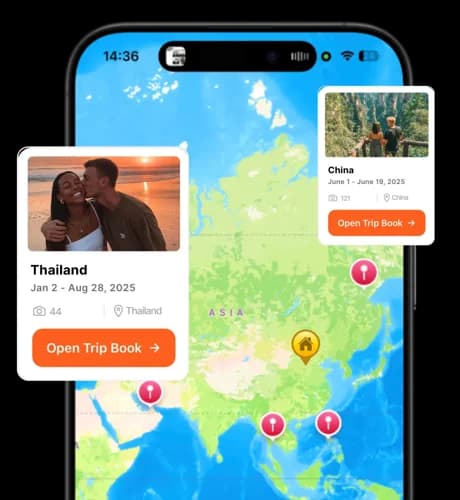
- Every moment pinned to a place on the map
- Flip through like a book, day by day
- Everyone adds to the same trip story
- Share a beautiful book, not a photo dump
Simple Process
Photos to Story in Three Steps
Capture naturally
Take photos like you always do. Add quick captions when you feel like it—even just emoji work.
Photos become pages
Your photos land inside beautiful daily pages. The trip reads like a story, not a scroll.
Pin the places
Anchor moments to places on the map. "Where was that?" becomes "right there."
Features
Built for Real Travelers
Not another app that sits unused. TripMemo is designed for how people actually travel and take photos.
Photo-First Pages
Images lead the story. Even with zero captions, your journal looks stunning.
Map-Connected
Every photo knows where it happened. Tap a pin, see the moment.
Collaborative
Everyone on the trip adds to the same story. No more scattered group chats.
Offline-Ready
Capture photos in airplane mode, sync when you're back online.
Private by Default
Your photos stay on your device. You choose what to share, and when.
Share Like a Book
Send a beautiful journal link—not a chaotic Google Photos album.
Map-First Journaling
Your Photos, Pinned to Places
A great travel photo journal isn't just chronological—it's geographic. TripMemo ties photos to places, so the journey makes sense instantly.
- See all your trip pins at a glance
- Tap a pin to see photos from that spot
- Share an interactive map with your trip
- Never forget where that restaurant was

Make It Beautiful
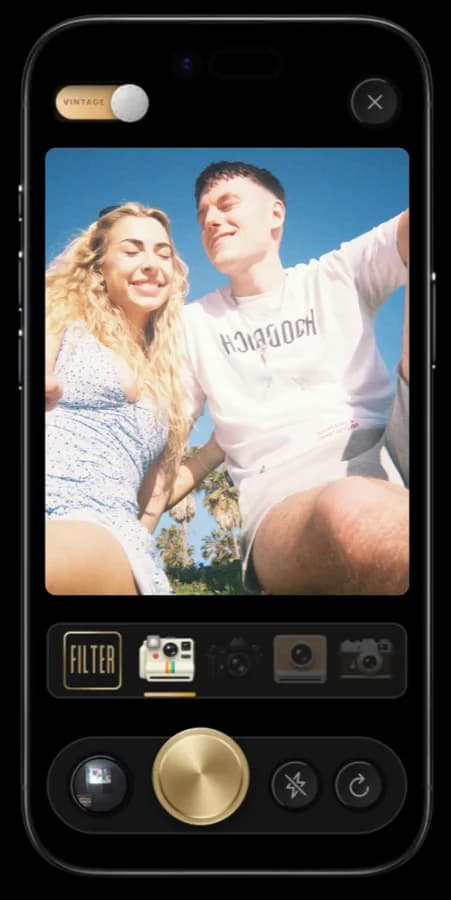
Film Vibes for Modern Travel
The best travel photo journals feel tangible—like something you'd print and keep. TripMemo leans into that: clean layouts, nostalgic aesthetics, and pages designed to be revisited.

Use Cases
Perfect for Every Trip
Vacations
Turn two weeks in Europe into a book you'll actually open again
Group Trips
Everyone contributes, one shared story emerges
Honeymoons
Your first trip together, preserved beautifully
Adventures
Hikes, road trips, and explorations—mapped and documented
Join the Newsletter
Get TripMemo updates, photo journaling tips, and new tools in your inbox. No spam—unsubscribe anytime.
FAQ
Frequently Asked Questions
What is a travel photo journal app?
A travel photo journal app turns your travel photos into a story: day-by-day pages, captions, and places on a map. It's not just storage—it's a journal you can relive and share.
How is this different from Google Photos or my camera roll?
A camera roll is chronological and chaotic. TripMemo organizes photos into daily pages, anchors moments to places, and turns your trip into a book-like experience you can share—not a folder of 2,000 unnamed files.
Can I make a travel photo journal with friends?
Yes. TripMemo is designed for shared trips—everyone can contribute photos and moments to the same story. Perfect for group trips, couples, and family holidays.
Are my photos private?
TripMemo is private by default. Your photos stay on your device until you choose to share. You control what gets shared and with whom—always.
Can I get a vintage or film look for my photos?
Yes. TripMemo includes film-inspired aesthetics, and you can also use our free tools like the Polaroid Camera and Vintage Filter to style individual photos before adding them to your journal.
Does it work offline?
Yes. TripMemo is built for travel days with bad signal. Capture photos offline, add captions, and sync when you're back online.
What's the difference between a photo journal and a diary?
A photo journal is photo-first—images lead the story, with captions supporting. A diary is text-first with photos added. TripMemo works beautifully for both styles, but the photo journal approach means even "lazy" journaling looks stunning.