Best FindPenguins Alternative (2026)
A memory-first FindPenguins alternative with TripBooks, Polaroid layouts, offline capture, and real-time collaboration.
.webp&w=96&q=75&dpl=dpl_EPXMHFF758wZiFUsuw99japedPYQ)











People who switched from FindPenguins
Hear from travelers who made the switch and why they stayed.
“FindPenguins was great for sharing publicly, but I wanted something more private and personal. TripMemo's private-by-default approach felt right.”
Anna K.
Long-term traveler • Amsterdam, NL
“The social feed aspect of FindPenguins felt like another Instagram. TripMemo is a personal library. My trips are mine, not content for followers.”
Michael W.
Photographer
“We liked FindPenguins but wanted real collaboration—not just following each other. TripMemo lets us build the same TripBook together, simultaneously.”
Lisa & Sam
Couple
Tasteful take
FindPenguins is great at Blogging
TripMemo is great at Remembering
Use the tool that matches how you want to capture and share your trip.
If you want travel blogging
FindPenguins is great for creating public travel blogs with GPS footprints. It has a community of travelers who share and explore each other's journeys.
Best for
- Travel blogging
- GPS route tracking
- Public sharing & community
If you want a TripBook you'll revisit
TripMemo is for people who want the trip to feel like a story: pages, captions, places, and a library of trips that feels permanent.
Best for
- Memory preservation
- Beautiful Polaroid layouts
- Group trips with real-time collab
- Offline journaling
Which traveler are you?
See how TripMemo fits your travel style.
What you get with TripMemo
The Memory Stack
built for real travel
Everything below is designed around the TripBook: pages, places, people, and the feeling of reliving the trip years later.
TripBooks + pages (not footprints)
Each trip becomes a digital book. Each day becomes a page. Photos and notes live together, so your trip reads like a story—not scattered footprints on a map.


.webp&w=3840&q=75&dpl=dpl_EPXMHFF758wZiFUsuw99japedPYQ)
%2520copy.webp&w=3840&q=75&dpl=dpl_EPXMHFF758wZiFUsuw99japedPYQ)
%2520copy%25204.webp&w=3840&q=75&dpl=dpl_EPXMHFF758wZiFUsuw99japedPYQ)
Offline mode that keeps up
Write notes, add photos, reorder pages—offline. TripMemo queues everything locally and syncs automatically when you're back online.
Network
Searching...
Photo captured
Offline Queue
Journal entry
Offline Queue
Layout updated
Offline Queue
Real-time collaboration
One trip. One shared TripBook. Friends add photos, notes, and edits—and everyone sees it instantly. No more scattered group chats.
Share links
Built for group trips.
Download all photos
Built for group trips.
Reorder pages
Built for group trips.
Everyone contributes
Built for group trips.
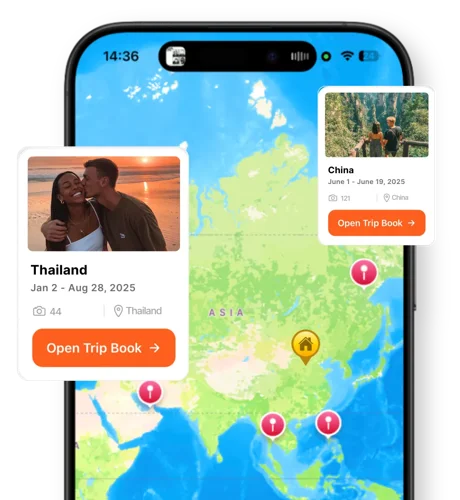
Maps for reflection
Your TripBooks live on a world map. Inside each TripBook, memories are pinned where they happened—so the story clicks instantly.
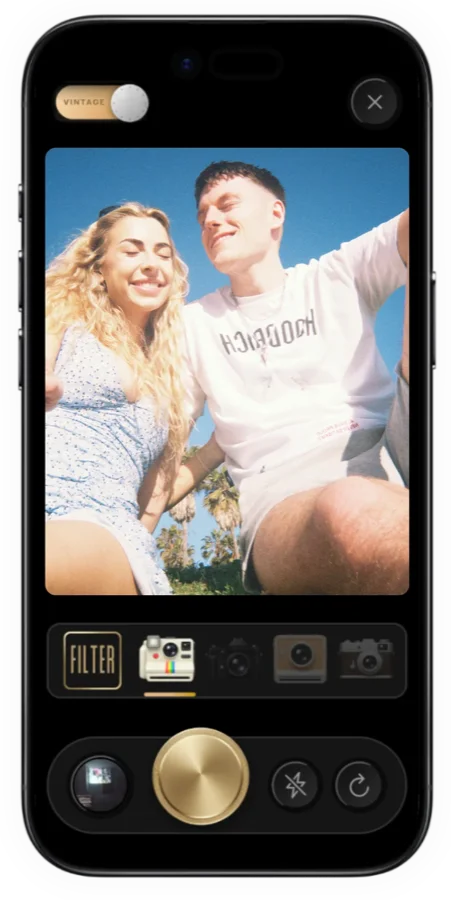
Vintage camera (4 LUTs)
Capture photos that feel nostalgic and intentional—right in the app. Four custom LUTs make your memories look like keepsakes the moment you take them.
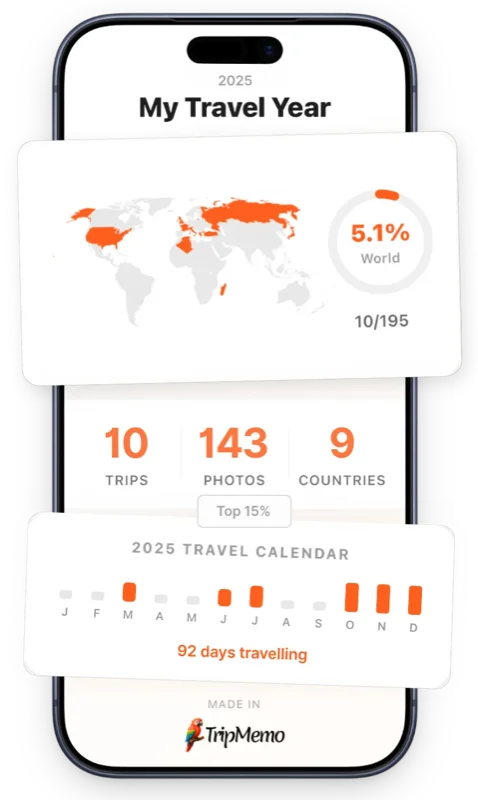
Stats + progression
See countries visited, places explored, and your travel calendar. TripMemo adds playful progression (levels, missions, and Trippin') without turning your memories into a social feed.
TripBooks
Pages, not footprints
Offline Mode
Write now, sync later
Collaboration
Everyone adds moments
Vintage Camera
4 custom LUTs
How to switch from FindPenguins
FindPenguins offers data export through their settings.
Export your FindPenguins data
Go to Settings in FindPenguins and request a data export.
Download TripMemo
Get TripMemo from the App Store and create your account.
Create TripBooks for your travels
Each footprint/trip becomes a TripBook. Bulk upload your photos.
Enjoy private by default
Your TripBooks are private unless you choose to share. No social pressure.
No risk, no pressure
FindPenguins data stays with them. TripMemo gives you a private, personal alternative.
FAQ
FindPenguins Alternative Questions
Quick answers to the questions people ask before switching.
Is TripMemo a good FindPenguins alternative?
Does TripMemo track my route automatically like FindPenguins?
Can I still see my trip on a map?
Does TripMemo work offline while traveling?
Can my friends add their photos to the same trip?
Does FindPenguins have photo limits?
Can I print my travel journal from TripMemo?
Does TripMemo have a built-in vintage camera?
Can I bulk upload photos after a trip?
How do I download TripMemo?
Will I lose my FindPenguins footprints if I switch?
What if I still want to share publicly?
Can I use TripMemo offline while traveling?
More Comparisons
Exploring Other Travel Apps?
See how TripMemo compares to other popular travel journal and tracking apps.

%20copy%202.webp&w=384&q=75&dpl=dpl_EPXMHFF758wZiFUsuw99japedPYQ)
%20copy%203.webp&w=384&q=75&dpl=dpl_EPXMHFF758wZiFUsuw99japedPYQ)

Your trips deserve
more than a camera roll
Turn travel photos into books you'll actually look back on.