


Max
Co-Founder, TripMemo
8 min read•Published
Summary
Stop burying your memories in messy Instagram slides. Learn why curation is the new storytelling and how to turn your camera roll into a digital masterpiece.
We’ve all seen it. The 10-slide Instagram carousel titled "Recents," "Dump," or "✨."
It usually looks like this: a blurry sunset, a half-eaten pasta, a mirror selfie, a random street sign, and maybe—if you’re lucky—a photo where everyone is actually looking at the camera.
The "Photo Dump" was supposed to be a low-pressure way to share. But in 2025, it’s become something else: a digital junk drawer.
It’s where memories go to be buried, not remembered. If you want to actually preserve your trip, it’s time to stop dumping and start curating.
Here is how to move from "Camera Roll Chaos" to "Aesthetic Storytelling."
The Problem with the "Scroll of Doom"
The human brain isn't wired to process 2,000 photos in a single sitting. When you "dump" your photos into a social media feed or a generic cloud folder, you are performing an act of Digital Hoarding.
Because there is no structure, your brain doesn't know what to anchor onto. Was that beach day before or after the mountain hike? Who was with us at that dinner? Without context and layout, the emotional weight of the memory evaporates.
The result? You never look back at them. And if you don't look back, did the memory even happen?
Curation is the New Storytelling
Curation isn't about being "fake" or "perfect." It’s about being intentional. It’s about picking the 1% of photos that actually make you feel something.
The "Before vs. After" of Travel Memories
| Before: The Camera Roll Chaos | After: The TripMemo Masterpiece |
|---|---|
| 47 near-identical shots of a sunset | One perfect "Polaroid" with a handwritten note |
| Screenshots of Google Maps | An interactive map with a pin exactly where you laughed |
| A "Dump" slide nobody swiped through | A beautiful Bento Grid that tells the story of the day |
| Forgotten in 48 hours | A digital keepsake you'll relive in 10 years |
How to Build Aesthetic Travel Pages (The TripMemo Way)
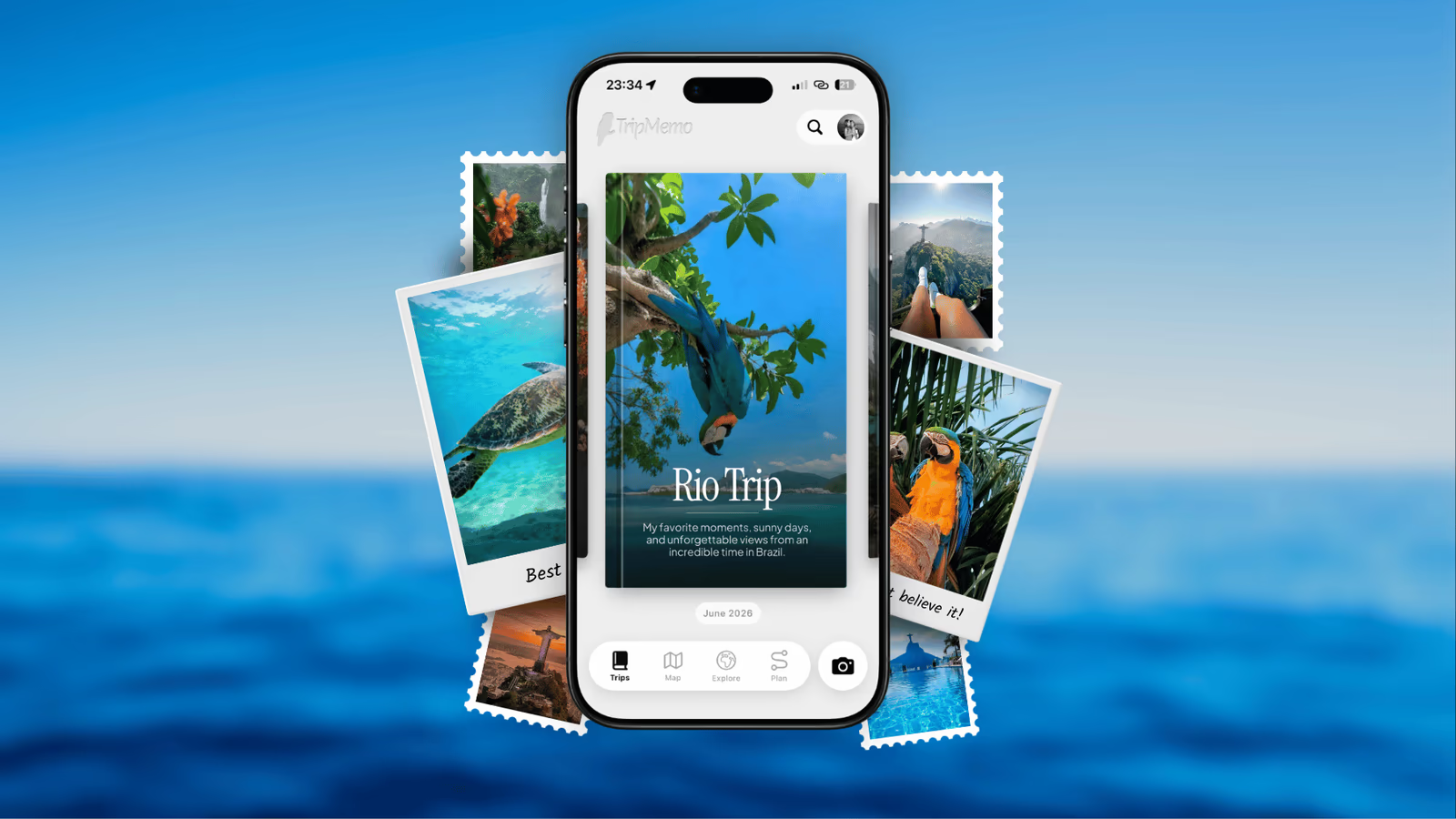
At TripMemo, we built the app to kill the photo dump. We believe travel memories deserve a "Coffee Table Book" treatment, not a junk drawer.
Here are the two layout styles that will transform your trip:
1. The Bento Grid (Organized Magic)
Inspired by the Japanese lunchbox, the Bento Grid allows you to mix different photo sizes, orientations, and even notes into a single, cohesive layout.
- Why it works: It mimics how we actually remember—bits and pieces of different moments coming together to form one "vibe."
- The Look: It’s clean, professional, and sophisticated. It turns a "photo dump" into a "design choice."
2. The Polaroid Flow (Nostalgic Storytelling)
Sometimes, a single photo is enough. The Polaroid Flow puts your memory front and center with soft shadows, white frames, and editable captions directly on the "photo."
- Why it works: It feels tactile. It triggers the same emotional response as flipping through a physical scrapbook.
- The Look: Timeless. It’s for the moments that deserve to breathe—the ones that are more than just a "slide."
3 Steps to Your First Aesthetic Page
If you have a camera roll full of chaos right now, do this:
Step 1: The 1% Rule
Pick the top 5 photos from your day. Not 50. Not 15. Just 5. If it doesn't make you smile or remember a specific feeling, it doesn't make the cut.
Step 2: Add "Context, Not Captions"
Don't just write "Rome, Italy." Write "The day we got lost and found that pasta place with the rude waiter. Best meal of the trip." That context is the glue that keeps the memory from fading.
Step 3: Choose Your Layout
Use TripMemo to bulk upload those 5 photos. The app will automatically sort them into a beautiful, chronological TripBook. Switch between the Bento view for a modern feel or the Polaroid view for that nostalgic travel journal aesthetic.
Summary: Stop Dumping, Start Reliving
The "Photo Dump" is a task; a TripBook is a treasure.
You spent thousands of dollars and hundreds of hours on your trip. Don't let the memories end up in a messy 10-slide graveyard. Give them a home that reflects the beauty of the journey.
Learn More
Aesthetic Journaling FAQ
- What is a "Bento Grid" in travel journaling?
A Bento Grid is a layout style that organizes different sized photos and notes into a structured, rectangular grid. It’s highly aesthetic and allows you to see the "vibe" of a trip day at a single glance, much better than a standard scrolling feed.
- How can I make my travel photos look more aesthetic?
Beyond curation, using built-in filters (like the TripMemo Vintage Camera) and choosing a consistent layout style (like Polaroids) can instantly elevate the "look" of your memories without needing professional editing skills.
- Is TripMemo better than Instagram for trip recaps?
While Instagram is for sharing with everyone, TripMemo is for preserving for yourself. TripMemo offers interactive maps, chronological sorting, and offline support—features Instagram doesn't have—making it a superior tool for long-term memory keeping.
- How many photos should be in a travel recap?
Quality over quantity is key. Aim for 5-10 "hero" shots per day that truly capture the mood. TripMemo allows you to add as many as you want, but the best TripBooks focus on the standout moments that tell a cohesive story.
- Why do I forget my trips so quickly?
This is often called "Digital Amnesia." When we dump hundreds of photos without ever organizing or reflecting on them, our brains offload the memory to the device. By curating a TripBook, you actively engage with the memory, reinforcing it for the long term.
- Can I collaborate on a travel page with friends?
Yes! TripMemo’s real-time collaboration allows you and your travel buddies to add photos and notes to the same shared TripBook, making it a collective storytelling experience rather than a solo photo dump.
- Is it possible to turn my existing camera roll into an aesthetic page?
Absolutely. TripMemo's bulk upload feature automatically sorts your past photos into chronological days and maps them, giving you an instant starting point to curate and stylize your journey.
Related reading:
- How to Share Trip Photos With Family Without Social Media
- How to Make a Digital Travel Scrapbook in 2026
- Your Travel Year in Review: A Private December Dump
- Travel Photography for Memory, Not Instagram
- 9 Things to Do With Your Travel Photos After a Holiday
- How to Organize Travel Photos
Upgrade from the photo dump. TripMemo turns your camera roll chaos into an organized travel story.
Join the TripMemo
Newsletter
Unsubscribe anytime. Read our privacy policy.