Best Apple Notes Alternative (2026)
Stop using a notes app as a travel journal. TripMemo is purpose-built with TripBooks, Polaroid layouts, and automatic organization.
.webp&w=96&q=75&dpl=dpl_EPXMHFF758wZiFUsuw99japedPYQ)











People who switched from Apple Notes
Hear from travelers who made the switch and why they stayed.
“I had travel notes scattered across dozens of Apple Notes. No organization, no visuals. TripMemo turned that chaos into beautiful TripBooks.”
Jennifer R.
Casual traveler • Seattle, US
“We tried sharing an Apple Notes folder for trips. It was a mess. TripMemo's collaborative TripBooks are designed for couples from the start.”
David & Lisa
Couple
“Apple Notes is fine for quick jots but terrible for travel memories. TripMemo gives my trips the presentation they deserve.”
Ryan M.
Backpacker • Vancouver, CA
Honest take
Apple Notes is great at Quick Notes
TripMemo is great at Travel Memories
Use the right tool for the job. Notes for quick capture. TripMemo for lasting memories.
If you need quick notes
Apple Notes is perfect for quick, unstructured note-taking. It's built into iOS, completely free, and syncs across Apple devices. For simple lists and reminders, it's hard to beat.
Best for
- Quick note capture
- Simple lists & reminders
- Zero learning curve
If you want lasting travel memories
TripMemo is purpose-built for travel: TripBooks with pages, Polaroid layouts, automatic organization, maps, stats, and collaboration. Everything Apple Notes isn't designed for.
Best for
- Organized travel memories
- Polaroid-style photo layouts
- Real-time collaboration
- Maps, stats, and gamification
What you get with TripMemo
The Travel Stack
Apple Notes can't match
Everything below is purpose-built for travel—not retrofitted from a notes app.
TripBooks (not notes)
Each trip becomes a digital book. Each day becomes a page. Photos and notes live together with structure—not scattered across random notes.


.webp&w=3840&q=75&dpl=dpl_EPXMHFF758wZiFUsuw99japedPYQ)
%2520copy.webp&w=3840&q=75&dpl=dpl_EPXMHFF758wZiFUsuw99japedPYQ)
%2520copy%25204.webp&w=3840&q=75&dpl=dpl_EPXMHFF758wZiFUsuw99japedPYQ)
Offline mode (like Notes)
TripMemo works offline just like Apple Notes. Write notes, add photos, edit TripBooks without internet. Everything syncs when you're back online.
Network
Searching...
Photo captured
Offline Queue
Journal entry
Offline Queue
Layout updated
Offline Queue
Real collaboration
Apple Notes has basic sharing. TripMemo has real-time collaboration—multiple people adding photos and notes simultaneously, with changes appearing instantly.
Share links
Built for group trips.
Download all photos
Built for group trips.
Reorder pages
Built for group trips.
Everyone contributes
Built for group trips.
Maps (Notes has none)
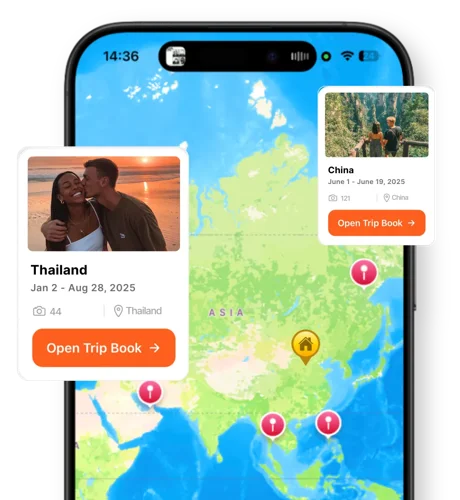
Your TripBooks appear as pins on a world map. Inside each TripBook, memories are pinned where they happened. Apple Notes has no map features at all.
Vintage camera (4 LUTs)
Capture photos that feel nostalgic and intentional—right in the app. Apple Notes has no camera features. TripMemo has 4 custom LUTs for beautiful travel photos.

Stats + gamification
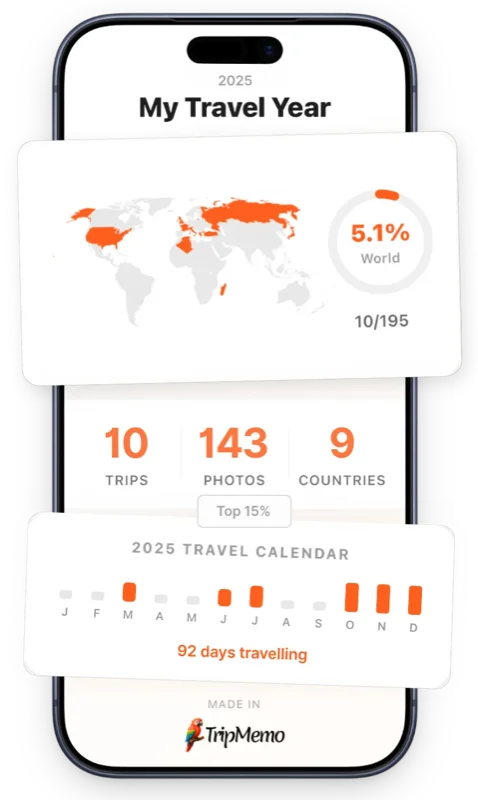
See countries visited, places explored, and your travel calendar. TripMemo adds playful progression (levels, missions)—features Apple Notes will never have.
TripBooks
Not random notes
Offline Mode
Like Apple Notes
Collaboration
Real-time editing
Vintage Camera
4 custom LUTs
Which traveler are you?
See how TripMemo fits your travel style.
How to switch from Apple Notes
You can export Apple Notes as PDFs or copy text. Photos from trips are likely in your camera roll.
Gather your travel photos
Your photos are probably in your camera roll. Apple Notes may have some embedded too.
Download TripMemo
Get TripMemo from the App Store. Quick and easy setup.
Create TripBooks for past trips
Use bulk upload to organize photos by trip. Add notes from your Apple Notes.
Use TripMemo going forward
Dedicated travel journaling beats generic note-taking. Everything in one beautiful place.
No risk, no pressure
Keep Apple Notes for general notes. Use TripMemo specifically for travel—it's purpose-built for the job.
FAQ
Apple Notes Alternative Questions
Quick answers about upgrading from Apple Notes to TripMemo for travel.
Why use TripMemo instead of Apple Notes for travel?
What's wrong with using Apple Notes for travel?
Does TripMemo organize photos automatically?
Does TripMemo work offline like Apple Notes?
Can I collaborate with friends in TripMemo?
Does TripMemo have a map view?
Can I see travel stats in TripMemo?
Does TripMemo have a camera?
How is TripMemo different from Apple Notes?
Can I import my Apple Notes travel content into TripMemo?
More Comparisons
Exploring Other Travel Apps?
See how TripMemo compares to other popular travel journal and tracking apps.

%20copy%202.webp&w=384&q=75&dpl=dpl_EPXMHFF758wZiFUsuw99japedPYQ)
%20copy%203.webp&w=384&q=75&dpl=dpl_EPXMHFF758wZiFUsuw99japedPYQ)

Your trips deserve
more than a camera roll
Turn travel photos into books you'll actually look back on.